Know who needs attention
See new leads, missed touches, and stalled opportunities in one place.
Lead Director, in conversation Beta
Ask GPT about a lead. Get their current stage, a visual path to enrollment, and the next trial date—all from Lead Director.
Already have access? Launch Lead Director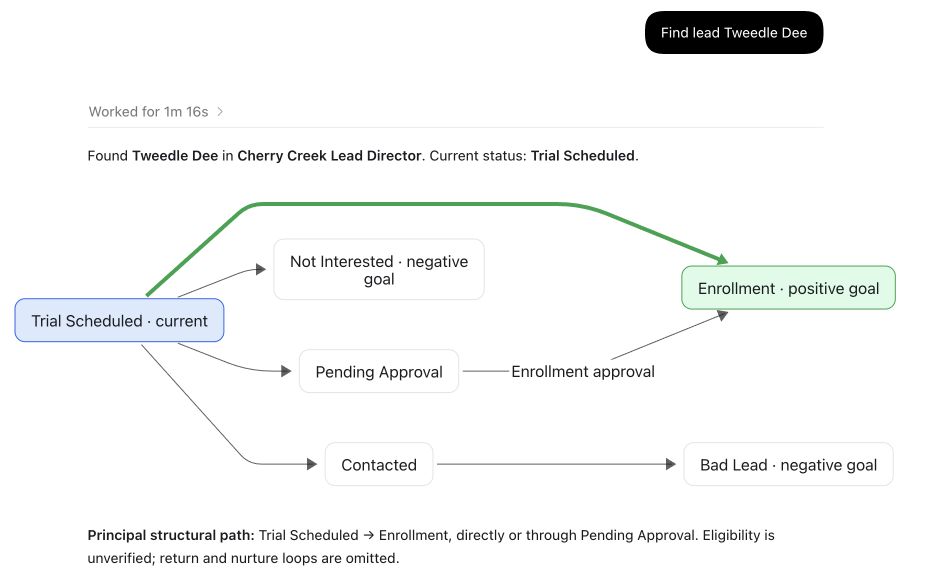
01 Find the right recordA name brings back the lead and their current stage.
02 Understand the pathSee the route to enrollment and the other possible outcomes.
03 Keep the next date in viewThe response includes the scheduled trial and the limits of the available evidence.
The details that move work along
The same response brings the scheduled trial into view, so the team can prepare for the conversation.

Principal structural path: Trial Scheduled → Enrollment, directly or through Pending Approval. Eligibility is unverified; return and nurture loops are omitted.
Trial: September 16, 2026, at 11:00 a.m. MDT.
A calmer sales day
Lead Director turns scattered lead work into one guided operating path.
See new leads, missed touches, and stalled opportunities in one place.
Use a ranked queue and stage guidance to focus the day.
Work with live calendar availability and keep meetings tied to the lead.
Ask for a plan, drafts, a call list, or a pipeline check in plain English.
How it works
The installed BOS product brings its GPT Skill through the single BOS MCP connection. Lead Director supplies the live pipeline workflow behind it.
Describe the queue, follow-up, booking, or pipeline result you need.
BOS projects authorized Education Center tools through the user's existing platform connection.
BOS works through the authorized pipeline and managed integrations.
Lead operations
Readiness labels show what is active now and what remains in beta.
Bring leads in from supported sources, including Google Sheets workflows.
Bulk intake · source contextRank the queue so the right person can work the right lead next.
Stages · queues · role contextCall, email, or text from the lead record and keep the history together.
One-tap actions · templatesUse Google Calendar context to coordinate meetings and next steps.
Availability · event creationSupport outbound qualification and inbound receptionist workflows with operator control.
Voice workflows · warm transferReview pipeline state, response activity, and the work that still needs attention.
Reports · exceptions · outcomesSee the work
The demo shows the guided product experience where your team drives each interaction.
Product demo · Lead Director Base
Managed integrations
The available Education Center GPT Skill never needs your provider credentials in chat. BOS owns authorization, scope, and the provider connection.
Beta access
Beta access is for teams that want a guided lead queue today and a governed path to GPT-assisted operations.
Questions
The beta focuses on the daily lead operating path: intake, queue, follow-up, scheduling, and pipeline state. Fit depends on your current systems and process.
Allowed actions depend on the authenticated BOS connection, your role, provider authorization, and workflow controls. The interface shows when work is drafted and when an action has been completed.
Provider credentials stay in BOS-managed credential storage. They are kept out of chat, skill files, and customer settings.
The team reviews your use case and follows up about beta fit, setup, current availability, and any commitment required.
Request beta access and see how Lead Director fits your team’s operating day.