01
Director planning
Bring schedules, lead work, staffing needs, and open issues into a focused daily plan.
Daily plans · weekly summariesGPT skills for education teams Available
Reconcile an invoice. Plan a week of camps. Prepare trial follow-up. Let an agent answer calls, book calendar appointments, and handle scheduled or on-demand callbacks. Education Center skills bring your connected services together and return the work for review.
The request to GPT
“Compare our last submitted Acme.org Partnership invoice with current enrollments. Find what’s missing and create the next report.”
The result, summarized
The missing enrollment days were reconciled.
Your request sets the goal. The skills guide the work. BOS controls access to the connected services.
Ask for the whole job
Explore how skills carry a task across the systems your team uses.
Completed workflow · summarized above
“Find enrollment days missing from the last invoice and prepare the next submission.”
What the skill brings together
You get the findings and a file to review.
Illustrative workflow · example request
“Show next week’s paid camp registrations and Acme.org Partnership drop-ins by day. Find open seats and flag placements that need review.”
What the skill checks
The output is a daily capacity view and a short review list.
Illustrative workflow · example request
“Compare this week’s trials with the calendar and parent emails. Flag mismatches and draft the follow-up for confirmed bookings.”
What the skill checks
The team gets a reconciled trial list and follow-up to review.
The skills in your corner
Each skill brings the checks, source choices, and output format for a specific job.
Bring schedules, lead work, staffing needs, and open issues into a focused daily plan.
Daily plans · weekly summariesReview rosters, section capacity, paid registrations, and partner attendance by day.
Rosters · open seats · placement reviewMatch leads to bookings and enrollment evidence. Surface gaps before the next follow-up.
Lead Director · calendar · student recordsRead the relevant message history, prepare a response, and identify issues for staff review.
Email evidence · drafts · escalationCompare attendance evidence with prior reports and prepare the required reimbursement workbook.
Acme.org Partnership · reconciliation · ExcelPrepare campaigns and review how paid leads progress toward trials and enrollment.
SendGrid · paid leads · outcome reportsFrom lead lookup to agent calling
See the lead’s details and path toward enrollment in GPT. Then ask your configured voice agent to make the next call.
Connect your phone and calendar services so conversations can lead to booked appointments and timely follow-up.
Explore Lead Director →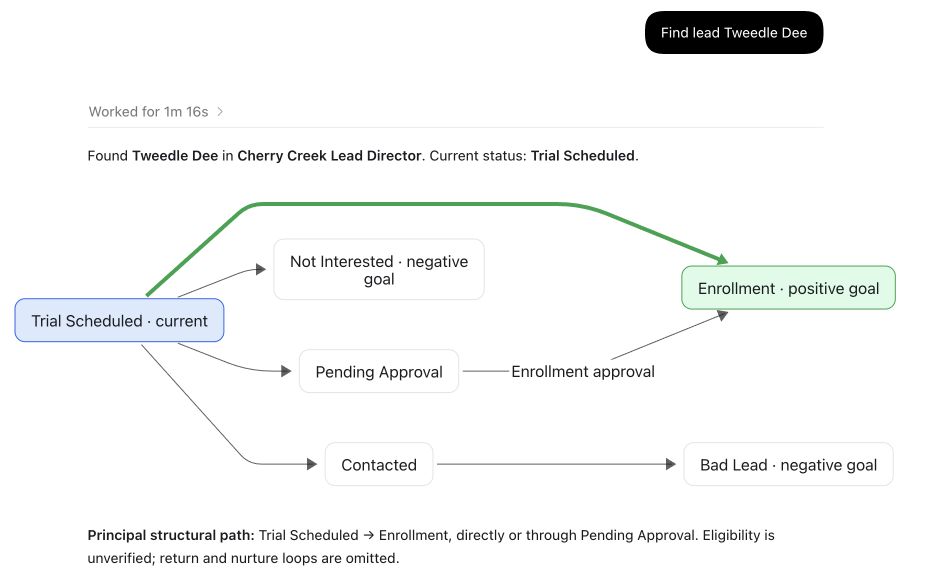
Example follow-up request
Have the agent call Tweedle Dee
GPT checks the selected lead’s available calling action, requests the authorized call, and reports the returned status.
Illustrative continuation of the real lookup above. Calling depends on current eligibility and your configured services.
Let your configured agent greet callers, answer questions, and capture what families need.
Use connected calendar availability to offer appointment times and book the selected slot during the conversation.
Schedule an agent callback for an agreed time, or request an on-demand call from GPT after finding the lead.
Connected services
The skills use your center’s configured connections. Available work depends on your role and the services you have enabled.
Classes, students, enrollments, capacity, and attendance evidence.
Trial bookings, schedules, availability, and appointment checks.
Parent correspondence, provider notices, and submitted attachments.
Lead records, current stages, and the path toward enrollment.
Shared documents, templates, and configured spreadsheet workflows.
Care authorizations and cancellations supplied through connected records and emails.
Campaign preparation and approved delivery through the configured workflow.
Auto-answer, calendar bookings, and scheduled or on-demand agent callbacks through configured voice services.
Get started
Education Center is a GPT skills package built on BOS. Set it up in a supported client, then connect the services your team uses.
Use the product packages for your supported GPT client. BOS supplies the platform connection.
Sign in, confirm your organization and role, and complete the requested service connections.
Start with one week of camp capacity, one invoice period, or one set of trials. Review the sources and result.
Before you begin
Lead Director provides the lead pipeline and staff workflow. Education Center packages skills for work across education operations, including Lead Director and connected enrollment, calendar, email, and reporting services.
The requested task, your role, and the workflow determine what can run. Drafts and reports are identified as such. Sending and record changes follow the relevant authorization and approval steps.
The skills surface conflicts, incomplete matches, and missing evidence. The team can review those exceptions before acting on the result.
Your setup selects the supported services for your center. A listed workflow needs its relevant connections and permissions. Ask about current fit and terms before making a paid commitment.